

Boost Your Testing Efficiency with Playwright: An In-depth Look at the Automation Tool

As the demand for faster and more reliable web applications continues to grow, so does the need for efficient and effective testing methods. One of the significant strides in the world of test automation is the emergence of Playwright—a powerful open-source automation framework developed by Microsoft.
With its advanced capabilities, such as multi-language support, cross-browser compatibility, record tests and the ability to handle complex testing cases, Playwright is quickly becoming the go-to solution for developers and testers alike.
How Test Automation Ensures Efficacy?
Efficiency in testing holds paramount importance for various reasons.
Firstly, it liberates valuable time previously consumed by repetitive tasks, enabling your team to concentrate on more pivotal developmental facets.
<br /. Secondly, it serves as a shield against the release of glitch-ridden web applications, upholding quality standards.
Lastly, heightened testing efficiency fosters swift feedback cycles, empowering continual iterations and enhancements within your team.
How Does Playwright Transform Testing Efficiency?
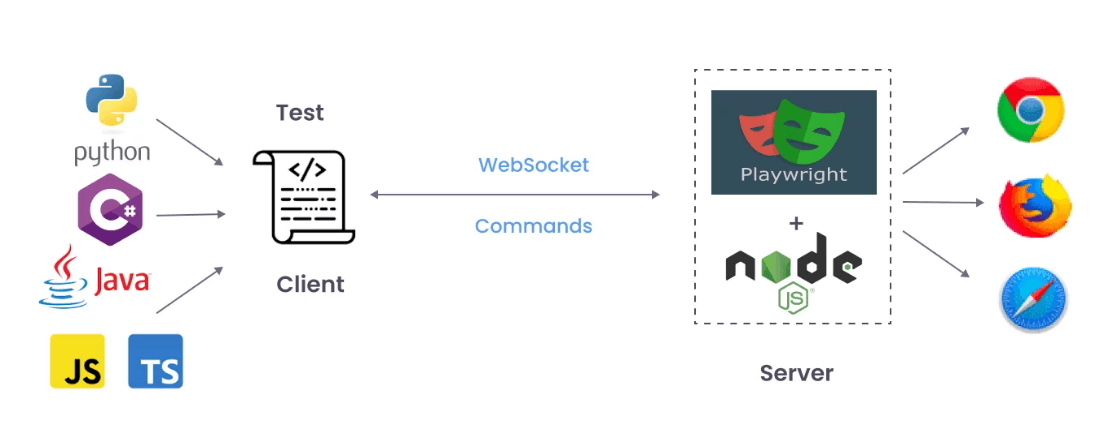
Playwright, developed by Microsoft, is reshaping the testing landscape with its diverse set of features. One notable aspect is its cross-browser compatibility, supporting major browsers like Chrome, Firefox, and Safari. This eliminates the need for separate scripts per browser, saving significant development time.
Additionally, Playwright shines in robustness and speed, offering a powerful API for creating reliable tests. Its automatic waiting and synchronization capabilities adeptly handle dynamic content and asynchronous operations, reducing unreliable test occurrences.
Notably, Playwright supports various programming languages—JavaScript, Python, C#—simplifying development and promoting seamless collaboration among team members.
Unlocking Testing Efficiency: Key Features of Playwright
In the realm of test automation, Playwright has emerged as a pivotal force, transforming conventional approaches. This section explores the core features of Playwright that hold the potential to substantially enhance your testing efficiency.
4.1 Recording Tests
Playwright comes with the ability to generate tests out of the box and is a great way to quickly get started with testing. It will open two windows, a browser window where you interact with the website you wish to test and the Playwright Inspector window where you can record your tests, copy the tests, clear your tests as well as change the language of your tests.
4.2 Cross-Browser Compatibility
Playwright's cross-browser compatibility is a standout feature that sets it apart from other automation tools. With support for major browsers like Chrome, Firefox, and Safari, you can conduct comprehensive testing across different platforms without the hassle of maintaining separate test scripts for each browser. This not only saves development time but also ensures consistent and reliable test results.
4.3 Powerful API for Reliable Test Scripts
One of Playwright’s strengths lies in its powerful API, which allows developers to write robust and maintainable test scripts. With Playwright's automatic waiting and synchronization capabilities, you can effortlessly handle dynamic content and asynchronous operations in your test scripts. This eliminates the chances of flaky tests and ensures reliable results, even in complex scenarios.
4.4 Built-in Support for Multiple Programming Languages
Playwright's built-in support for popular programming languages such as JavaScript, Python, and C# makes it versatile and accessible to developers. This allows you to work in your preferred language, increasing productivity and facilitating collaboration among team members with diverse language preferences.
4.5 Seamless Integration with CI/CD Pipelines
For teams adopting Continuous Integration and Continuous Deployment (CI/CD) practices, Playwright can be seamlessly integrated into existing pipelines. Automated test execution with every code change provides rapid feedback, allowing
Streamlining testing processes with Playwright's powerful APIs
One of the standout features of Playwright is its ability to automatically discover web elements on a page. With just a few lines of code, you can easily find and interact with elements like buttons, input fields, and dropdown menus. This eliminates the need for manual verification and saves your valuable time. Playwright's APIs offer a page tracing capability that allows you to collect detailed information about interactions between scripts and the web pages. By enabling this feature, you can gain valuable insights about network requests, performance metrics, and JavaScript errors. This information can help you identify and resolve issues, which makes testing more efficient and improves application performance.
Playwright's APIs allow you to run test scripts in parallel, increasing the overall test execution time. It also allows you to distribute tests across multiple instances of browsers, as it significantly reduces the time it takes to complete your test suite. This not only improves your testing efficiency but also helps you meet tight project deadlines. By leveraging the power of Playwright's APIs, you can improve your testing processes and achieve faster, more reliable results.
Want to Maximize Playwright's Potential? Follow These Expert Tips!
Utilize Playwright's Built-in Test Runner: Playwright comes with a built-in test runner that allows you to run tests in parallel across multiple browsers and devices. By optimizing the test execution process, you can save valuable time and speed up your testing cycles.
Incorporate Error Handling and Reporting: By implementing proper error handling and reporting mechanisms in your Playwright scripts, you can easily identify and troubleshoot issues. Playwright provides comprehensive error messages, stack traces, and snapshots, making it easier to diagnose and fix failures.
Take Advantage of Headless Mode: Playwright supports running tests in headless mode, which means the browser runs without a visible UI. This significantly speeds up test execution and allows you to run tests in environments without a graphical user interface.
Conclusion: Embrace Playwright and revolutionize your testing efficiency
Playwright is a powerful and versatile automation testing tool that offers cross-browser compatibility, multi-language support, and robustness. Its ability to work seamlessly with different browsers and platforms, along with its extensive features and integration with popular testing frameworks, makes it an ideal choice for automating the testing of web applications. Whether you are a developer or a tester, Playwright can help you streamline your testing process, improve the quality of your applications, and accelerate your software development cycle.